
Introduction to Salesforce
- Salesforce is the largest Customer Relationship Management (CRM) and one of the largest cloud based software applications in the world. Because the solution is hosted in the cloud it can be easily accessed from anywhere you have access to the internet – using a PC, tablet, or phone.
Key Components of Salesforce at NCS
- The key components of the system are accessible across the top of every screen. Those components include:

Accounts – An account is any business or organization that interacts with NCS. This includes customers, suppliers, manufacturers, general contractors, electrical contractors, distributors, and more.
There are two types of Customer accounts.
- Parent Accounts – Parent accounts are ONLY used for group multiple location accounts for reporting purposes. Reports can be executed against a Parent (to see the total activity for all locations) or against an individual location only. It is not necessary to create a Parent Account, they are strictly optional when it is helpful from a reporting perspective. Projects may not be created against Parent Accounts.
- Location Accounts – All projects are created against Location Accounts. In Salesforce terms, Location accounts are Child Accounts, or under Parent Accounts, from a hierarchy perspective.
Contacts – Contacts are the people within accounts. For our purposes, contacts need to be associated with an account. They can be associated with multiple account. To add a new contact, click the NEW button.
Projects – Projects are used to organize sales opportunities. All Salesforce opportunities are start with a project in the system. Projects should always be created from a Location Account.
Opportunities – Opportunities are used to quantify and track a possible sale. There can be multiple opportunities associated with a project. As an example, there might be a Structured Cabling, Security, Lighting, and Audio-Visual opportunity with a project.
Bids – In this system, Bids are designed to work just as they do at NCS today. Bids are tracked against Opportunities. They can be requested by a salesperson, initiated by an estimator, and revised.
The Sales Process at NCS
The sales process, from Account to Bids, is outlined below.
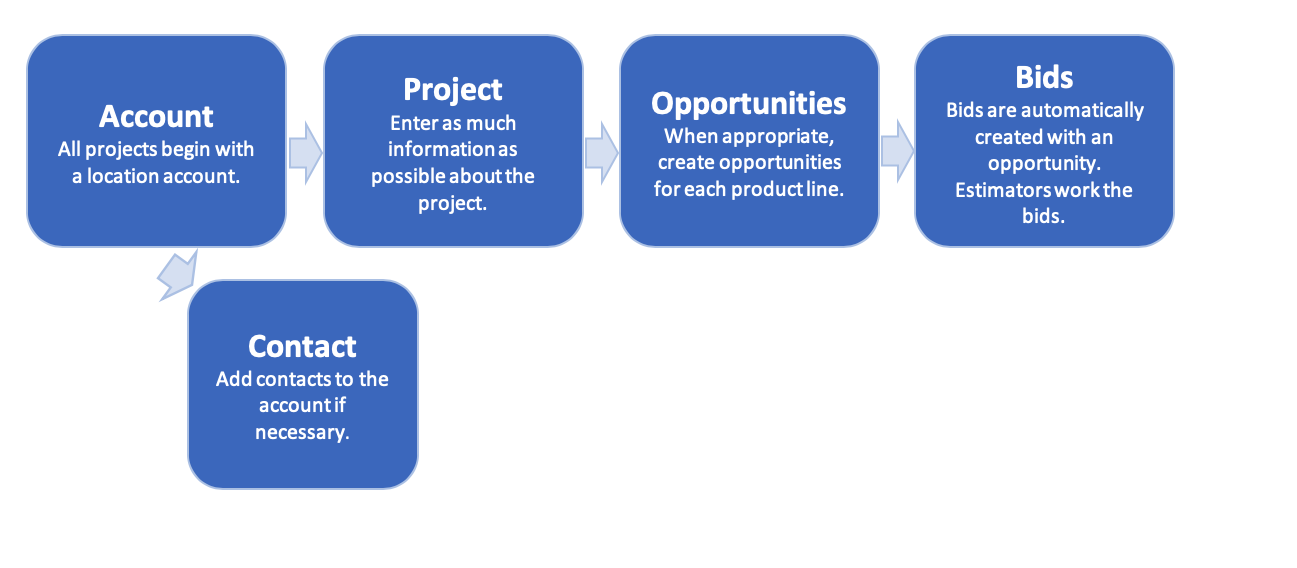
The Golden Rules
There are a few very important things to remember when starting the sales process. They are listed below.
- Everything starts with a project. Every lead is considered a project. When in doubt, the first step is to enter a project. Projects can consist of multiple opportunities.
- All projects start at the Account. More specifically, the always start at a LOCATION ACCOUNT. Select the proper location account, ensure all default vendors and estimators are correct, scroll down to ‘Projects’ and click ‘New’.
Naming Conventions
The naming convention for projects, opportunities, and bids are designed to communicate a great deal of information.
Projects
Project names consist of ACCOUNT-PROJECT NAME – BID DUE DATE.

Opportunities
When opportunities are created, the product line is appended to the end of the name. Note the STC for structured cabling in this case.

Bids
When estimators accept the bid and assign a name, it gets added. Bids can be revised and an ‘R1’ (revision number) is added to the bid. In the example below, the bid number is HOU-111-R1, but the account name, project name, bid due date, and product line are still visible. The bid name field can contain up to eighty (80) characters.

Key Reports and Dashboards
Opportunity Dashboard
Bid Dashboard
Opportunity Win/Loss Ratio
Comments
0 comments
Please sign in to leave a comment.